November 14, 2009

.the dora/robot/strawberry shortcake... er... cake.

My sister-in-law asked if I would make a cake for my cute little niece, Milli's, third birthday. Of course, being the self-taught cake student I am, I jumped at the chance to "practice" some more. Milli wanted a Dora/Robot/Strawberry Shortcake cake so I made this quirky little creation:


It was quite delectable (chocolate cake with cherry filling) and was super fun to make!

November 3, 2009

.flip-flopped chocolate chip cookies.


C'mon! You know you wanna try these...

Makes: Approx. 5 doz cookies

  • 2 1/4 cups flour
  • 2/3 cup cocoa powder
  • 1 tsp baking soda
  • 1/4 tsp salt
  • 1 cup (2 sticks) butter, softened
  • 3/4 cup sugar
  • 3/4 cup packed brown sugar
  • 2 eggs
  • 1 tsp vanilla extract
  • 2 cups white chocolate chip pieces


1. Preheat oven to 350.

2. Mix flour, cocoa, baking soda, and salt in medium bowl and set aside.

3. In large bowl, cream butter, sugar and brown sugar with electric beaters until uniform in consistency.

4. Add eggs to sugar mixture one at a time, beating to incorporate after each addition.

5. Stir vanilla into sugar mixture.

6. Slowly add flour mixture to sugar mixture, using electric mixer to blend everything together well.

7. Stir in white chocolate chips with a spoon.

8. Drop onto cookie sheet by rounded teaspoons (cookies will be on the small side) and bake in
preheated oven for 9-11 minutes. NOTE: All ovens are different so baking times are approximate. My oven bakes these cookies in 9 minutes, for example.

9. Let cookies sit on cookie sheet for two minutes after removing them from the oven, then let them cool on a cooling rack.

10. Enjoy!

Be sure to check out this and other recipes on my recipe blog, The Queen of Cuisine!

November 1, 2009

.button, button; who's got the button.

Want to let the whole wide web know you are a fan of this humble little blog? Just copy and paste this HTML code to your blog , myspace page, or website to help others find their way here!


 Copy the highlighted code below:
<a
target="_blank" the tales from trenches!="" href="http://truetalesfromthetrenches.blogspot.com/" title="Enter the trenches...">
<img src="http://i579.photobucket.com/albums/ss238/QueenofCuisine/Button-Blackandwhite-200pixels.jpg"
alt="Tales From The Trenches"/></a>


How to install this button on your Blogger blog:

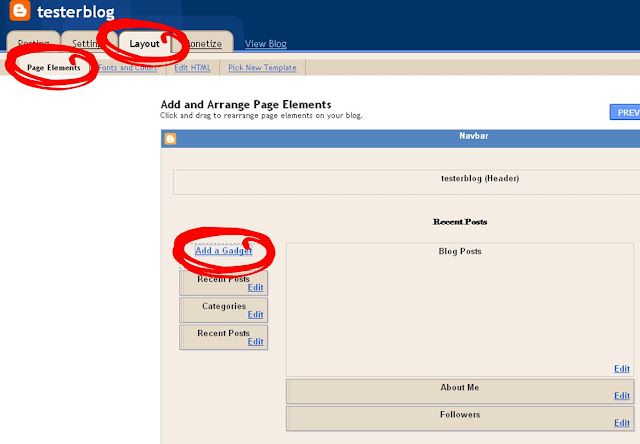
Step One: Go to the 'Layout' tab in for your blog. Select 'Page Elements' from the top menu bar. Click 'Add a Gadget.'


   Step Two: From the list of Blogger gadgets, choose 'HTML/Java Script.'


Step Three: Enter a title for your gadget, then paste the button code into the big empty content box. Click the 'Save' button.


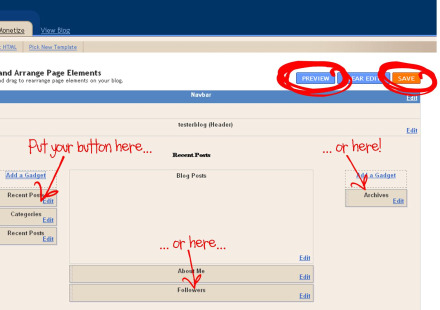
Step Four: Drag your button to where you want it, preview, and then save!


Step Five: Sit back, relax, and enjoy your brand new button!

 

©  2009 Tales From The Trenches